

How to Bulk Update Shopify Prices Without Losing Your Original Ones
A merchant emailed us at 11 on a Sunday night. Their festival sale had ended at midnight and roughly 400 variants were still sitting at sale prices. Someone on the team had exported a "before" CSV, except it got exported on day two of the sale, so half the rows already had the discount baked in.They spent Monday morning rebuilding prices from old order line items. The discount was never the hard part. Putting 400 prices back was.
Bulk Price Updater
5 minutes

Why prices get messy on Shopify faster than merchants expect
Shopify stores price at the variant level, not the product level. A t-shirt in four colors and five sizes is twenty separate prices, even though your catalog says you sell one shirt.
Run 300 products like that and a "quick sale" is six thousand price fields.
There's no native snapshot and no version history. Once you save, the old number is gone. That's the whole problem, and everything below is about closing it.
The three ways merchants do this today
Shopify's native bulk editor
Products, select items, Bulk actions, Edit prices. Fine for a handful of products and a one-off change.
Where it stops: you can't stack filters, so "everything from this vendor in size XL" isn't a thing you can select. And nothing gets backed up. If you want the old prices, you retype them.
CSV export and import
Export products, edit the Variant Price column in Sheets, import it back. Powerful for thousands of SKUs and for margin math you can only really do in a formula.
It's also the method that breaks stores. One shifted column and you've silently repriced the whole catalog with no preview and no warning. Reverting works only if you saved a clean export before you touched anything, which is the step people remember the day after they needed it.
A rule-based app
This is where most stores land once "run a sale" turns into "run a sale, then put everything back exactly as it was."
Most pricing tools treat revert as a nice extra feature. I'd argue it's the actual product. Applying a discount is a loop over some variants, and any competent developer can write that in an afternoon. Guaranteeing you can undo it three weeks later is the part that takes engineering.
What you need | Native bulk editor | CSV import | Bulk Price Updater |
|---|---|---|---|
Under 100 products | Fine | Overkill | Fine |
Target by vendor, tag, or collection | Limited | Yes | Yes |
Stack multiple conditions | No | Manually | Yes |
Preview before it goes live | No | No | Yes |
One-click revert | No | Only if you saved a backup | Yes |
Risk of a silent mistake | Medium | High | Low |
What we built, and the part that actually mattered
Bulk Price Updater is our free app for this. You build a rule from Vendor, Product Type, Tag, Collection, Variant Option, or All Products, stacked with AND logic, then pick the math: a fixed price, or a percentage or flat amount up or down.
That part is table stakes. Three decisions underneath it are the ones worth explaining.
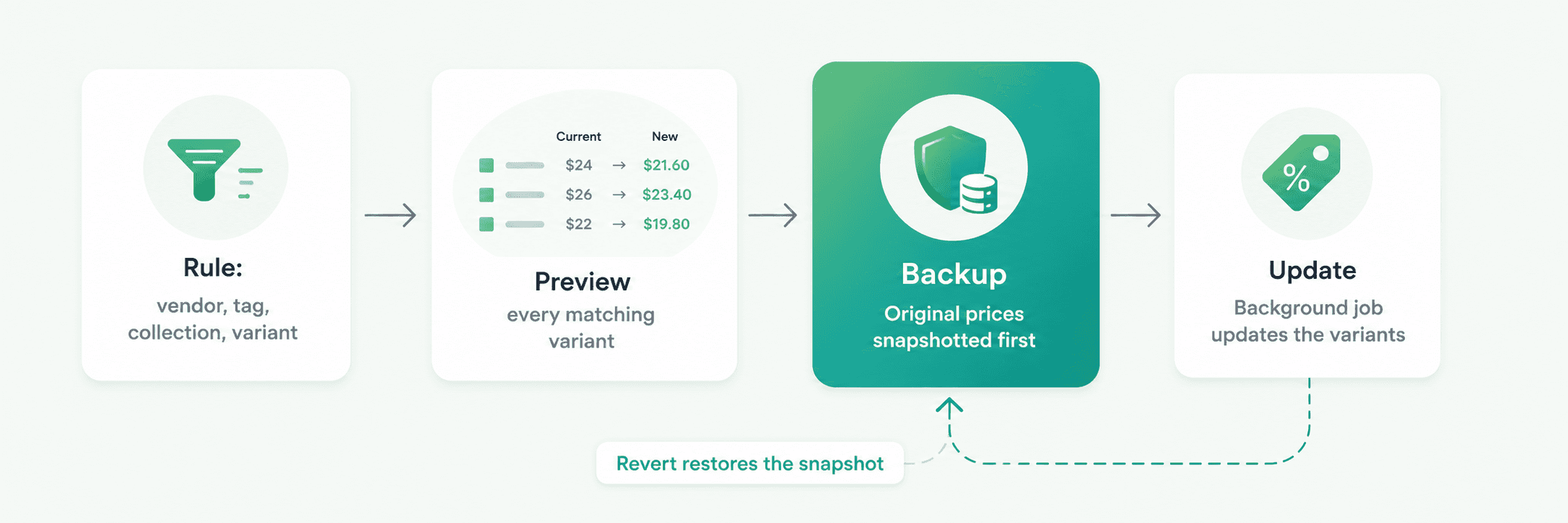
The backup writes before the update writes
Order of operations. We snapshot the original variant prices, confirm the snapshot is stored, and only then start writing new ones.
Do it the other way around and a failure halfway through leaves you holding a partially discounted catalog with no record of what any of it used to cost. Sounds obvious written down. It's exactly what a manual spreadsheet workflow gets backwards, because the human backup step is the one that gets skipped when someone's in a hurry at 9pm.
Preview exists because targeting is what goes wrong
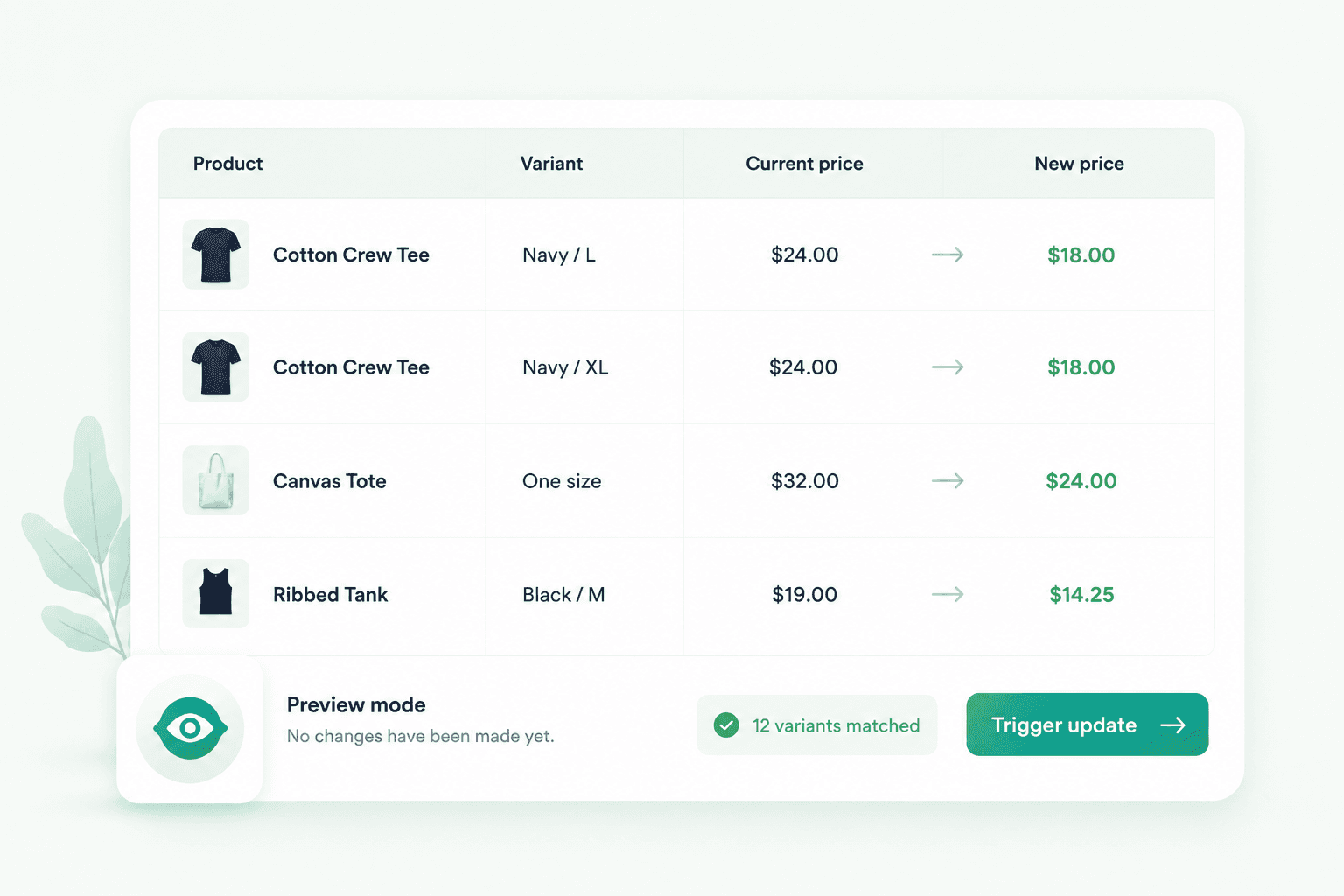
Before anything triggers, you see every matching variant with its current price next to its projected new price.
Almost none of the mistakes we've seen are pricing math errors. They're targeting errors. A tag that matched 900 products instead of 90. You spot that in a list in about two seconds. You don't spot it in a CSV.
The job runs in the background
A store-wide reprice is thousands of individual writes against Shopify's API, and that API has rate limits. So the update runs as a background job instead of inside a browser tab you're scared to close.
Start it, close the tab, go make chai. It keeps going.
Running a festival sale without the Monday morning panic
Build the rule for the collection, vendor, tag, or variant option you're discounting
Preview the matching variants and sanity-check the count
Trigger it
When the sale ends, open History and hit Revert
No file called prices_backup_FINAL_v2.xlsx. Nothing anyone has to remember on the last night of the sale.
Common questions
Can I update Shopify prices by vendor or tag?
Not properly with the native editor, which only filters one way at a time. A rule-based app lets you combine Vendor, Product Type, Tag, Collection, and Variant Option in a single rule.
Can I undo a bulk price change on Shopify?
Not natively, and not from a CSV import unless you saved a clean export first. You need a tool that snapshots original prices automatically before it writes anything.
Is there a free Shopify app for bulk price updates?
Yes. Bulk Price Updater is free to install and includes condition-based targeting, five pricing modes, preview, and revert.
Ready to try it?
Nothing changes until you press Trigger, so you can build a rule and preview the whole thing without touching a live price. Install it free from the Shopify App Store.
And if your pricing runs on something the app doesn't handle yet, cost-plus from a supplier feed, sale windows on a schedule, market-specific rules, tell us what your setup looks like. Custom work around our apps is a normal part of what we do.
Tell us how your pricing works and we'll tell you what's possible.

Experienced Shopify App Developer specializing in Shopify app development, e-commerce architecture, and merchant-focused solutions. Skilled in building reliable, scalable applications that enhance the shopping experience, improve store performance, and help merchants grow their businesses.
Reader guide
Use the links below to jump into next reading without leaving the article flow.
Blog categories
Recent posts
First Order Discounts: How to Increase Shopify Conversions
10 minutes
How to Feed Dynamic, Merchant-Configured Data Into a Shopify Function (Input Query Variables Explained)
10 minuts
How to Bulk Update Shopify Prices Without Losing Your Original Ones
5 minutes
What Shopify’s Native Discounts Can’t Do, and Why We Built Discountify
4 minutes

