

How to Feed Dynamic, Merchant-Configured Data Into a Shopify Function (Input Query Variables Explained)
If you've built a Shopify Function, you already know the input query is static — it's a fixed `.graphql` file compiled at deploy time. That's fine when your logic only needs data Shopify already exposes (cart lines, delivery addresses, discount classes). It breaks down the moment your function needs something the *merchant* configured through your app's admin UI — say, "only apply this shipping discount to products in these three collections," where the collections are chosen per-shop and can change at any time.
Discountify
10 minuts
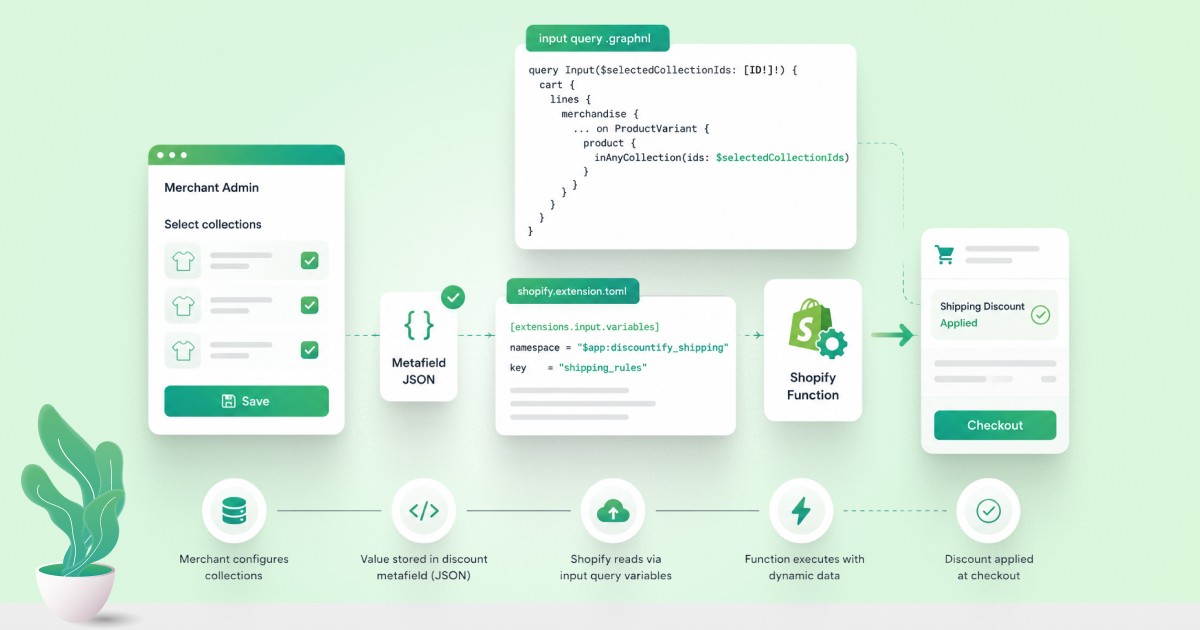
You can't just fetch a metafield inside the query and use its value as an argument to another field in the same query. GraphQL doesn't support that kind of dependent, two-stage resolution. A lot of developers hit this wall, assume Functions simply can't do dynamic targeting, and either hardcode values or give up on the feature. They can. You just need the right mechanism: input query variables, wired through shopify.extension.toml.
This post walks through the full setup end to end: the TOML config, the GraphQL query, the JS function logic, and the Ruby backend code that keeps the merchant's selection in sync. This is the exact pattern behind Discountify's collection-targeted shipping discounts, where merchants pick which collections qualify for free or discounted shipping directly in the app's admin UI, and that selection flows into a Shopify Function at checkout using this mechanism. If you'd rather skip building this from scratch, Discountify already ships it as a ready-made rule type.
The mental model
Three pieces work together:
A metafield on the discount node itself (not the shop, not the app installation) holding the merchant's current configuration as JSON.
A block in
shopify.extension.tomltelling Shopify which metafield to read and which query variable to populate from it.A GraphQL variable in your input query, declared like any normal GraphQL variable, that Shopify fills in automatically before invoking your function. No manual fetch required inside the query.
The key detail that trips people up: this only works with metafields on the function's owner. For a discount function, the owner is the specific discount node, the one returned when you created the automatic discount via the Admin API. Shop-level or app-level metafields cannot populate input variables this way, even though you can still read them as plain fields elsewhere in the query for other purposes.
Step 1: Wire the TOML
In your function extension's shopify.extension.toml, add [extensions.input.variables] as a sibling section to extensions.build, not nested inside extensions.targeting. This is the part most people get wrong; it's easy to assume it belongs next to the target definition since that's conceptually "where the query lives," but it doesn't.
namespace and key here must exactly match the metafield you're going to write to the discount node in Step 3. The $app: prefix is a reserved namespace pattern scoped to your app, and using it avoids collisions with other apps or merchant-created metafields on the same object.
Step 2: Declare the variable in your input query
Your .graphql input file needs the variable declared on the query itself, then referenced anywhere you need it:
Two things worth calling out:
inAnyCollectionandinCollectionsare targeted membership checks, not enumeration fields. Pass them an empty array and they will always return false/empty, that's correct behavior, not a bug. You have to give them the specific collection IDs you want checked, which is exactly what$selectedCollectionIdssupplies.The variable name (
selectedCollectionIdshere) is arbitrary, but it has to match a JSON property name inside the metafield value, which we set up next. Get this mismatched and the variable resolves tonull, which, because the type is[ID!]!(non-nullable), crashes function execution with anINVALID_VARIABLEerror rather than failing silently.
Step 3: Write the metafield onto the discount node
This is backend work in your app. Every time the merchant changes their collection selection, your app needs to push that value onto the discount's metafield. Two operations: find the discount node's ID, then set the metafield on it.
Call it like:
That produces a metafield value of:
The collection_ids.to_json.to_json double-call matters. The first .to_json turns the Ruby hash into a JSON string. If you then interpolate that string directly between manual quotes (value: "#{collection_ids.to_json}"), the quote characters already inside the JSON string break out of your GraphQL string literal and the query fails to parse, regardless of whether the array is empty or not. The second .to_json re-encodes that string as a properly escaped literal, safe to drop straight into the query text without wrapping it in quotes yourself.
If your GraphQL client supports passing real variables instead of string-interpolating the whole query, that's the more robust long-term fix. It sidesteps this escaping problem entirely, since the client library handles JSON encoding for you.
Step 4: Read it in your function code
On the function side, input.selectedCollectionIds now arrives already populated. No fetch logic needed in your Rust/JS function itself. In JavaScript:
Note input.selectedCollectionIds ?? [] as a defensive fallback. If the metafield hasn't been set yet (e.g. a merchant who hasn't configured anything), you want a graceful empty-array default here in your own code, separate from whether your GraphQL variable type is nullable. Speaking of which: during development, it's worth declaring the query variable as nullable ([ID!] instead of [ID!]!) so a missing metafield produces null instead of a hard function-execution error while you're still testing the wiring. Tighten it to non-nullable once you're confident the metafield is always set before the function can run in production.
Common mistakes, in order of how often they show up
Putting
[extensions.input.variables]inside[[extensions.targeting]]. It's a sibling section, not a nested one.Setting the metafield on the shop instead of the discount node. Shop-level metafields cannot feed input variables. Only metafields on the function's owner can.
Mismatched JSON key vs. query variable name.
{"selectedCollectionIds": [...]}in the metafield only populates$selectedCollectionIdsin your query, not$collectionIds, not$collections. They have to match character-for-character.Manually quoting an already-serialized JSON string when building the mutation via interpolation. Leads to a GraphQL syntax error that looks unrelated to the actual cause. Double-encode (
.to_json.to_json) or use real GraphQL variables in your HTTP client instead.Using
[ID!]!(non-nullable) before confirming the metafield is reliably set. A missing metafield resolves tonull, and a non-nullable type turns that into a hardINVALID_VARIABLEcrash instead of a value you can handle gracefully in code.
Once these four pieces are lined up (TOML config, query variable, owner-scoped metafield, and correctly escaped mutation), the function receives merchant-configured, fully dynamic data on every run, with zero extra API calls inside the function itself.
Why this matters if you're building or hiring for Shopify Functions
Shopify Functions run in a sandboxed WASM environment with strict input size limits and no runtime network access. That's exactly why patterns like this one matter so much: you can't just call an API from inside the function the way you would in a regular Rails controller or webhook handler. Every piece of dynamic, merchant-specific data has to be pre-resolved into the input payload before the function ever executes. Getting comfortable with metafield-driven input variables, GraphQL Admin API mutations, and the full Shopify Function lifecycle (build, deploy, target, input query, run) is core to building anything beyond a fixed-logic discount, shipping, or checkout customization on Shopify today.
This is the kind of implementation work we do daily at Essenify, a Shopify app development company based in Ahmedabad, India, building and maintaining a portfolio of public Shopify apps on Ruby on Rails: Discountify for automated and rule-based discounting, including Shopify Functions-driven shipping rules like the one in this post, AddOn Suggest for product add-on and cross-sell recommendations, AI Product Bundle Builder for bundle and "build your box" experiences, Product Quiz Builder (QuizBuddy) for guided-selling quizzes, FAQ Expert for merchant FAQ management, and Bulk Price Updater for large-scale catalog pricing changes.
If your team is evaluating custom Shopify Function development, whether it's discount logic, cart transforms, delivery customizations, or payment customizations, or needs help debugging a function that's deployed but silently not running (a surprisingly common issue), this is the kind of Shopify Functions and app architecture work our team handles end to end: from the Admin API mutation that creates the discount, through the metafield wiring covered here, to the deployed WASM function itself. If you'd rather see the finished feature than build it, Discountify already ships collection-targeted shipping discounts using exactly this pattern.

Ashok Damaniya is the Chief Technical Officer (CTO) at Essenify, where he leads the development of Shopify apps focused on helping merchants increase sales and improve the customer experience. His expertise spans Shopify app architecture, e-commerce solutions, and scalable cloud infrastructure. He is passionate about building practical tools that solve real merchant problems and enjoys turning insights from the Shopify ecosystem into products that are simple, reliable, and impactful.
Reader guide
Use the links below to jump into next reading without leaving the article flow.
Blog categories
Recent posts
First Order Discounts: How to Increase Shopify Conversions
10 minutes
How to Feed Dynamic, Merchant-Configured Data Into a Shopify Function (Input Query Variables Explained)
10 minuts
How to Bulk Update Shopify Prices Without Losing Your Original Ones
5 minutes
What Shopify’s Native Discounts Can’t Do, and Why We Built Discountify
4 minutes

