

What Shopify’s Native Discounts Can’t Do, and Why We Built Discountify
A merchant sent us a pricing table in May. She’d been running it out of a Google Sheet for two years. Six units, 10% off. Twelve units, 15% off. Twenty-four units, 20% off. Her four wholesale accounts paid a flat 35% off everything, no minimum, no code, permanently. Nothing exotic there. That’s how a lot of stores price. Shopify, out of the box, does the first line of that table and stops.
Discountify
4 minutes

Where Shopify's built-in discounts actually stop
The native discount engine is fine for what it is. Percentage off, fixed amount off, buy X get Y, free shipping. Set a minimum quantity or a minimum spend, apply it by code or automatically, schedule a start and end date. For a Black Friday sale, that's the whole job.
The wall shows up when your pricing has more than one step in it.
One rule, one threshold
A native discount carries a single condition. Buy 6 or more, take 10% off. Want a second step at 12 and a third at 24? That's three separate discounts sitting in your admin, and Shopify applies one automatic product discount to the cart, not the best combination of the three. Mixed carts get unpredictable fast.
So merchants type the tier table into the product description and hope the shopper does the arithmetic. Most don't.
Wholesale got much better this year, then hit a ceiling
In April, Shopify moved native B2B onto every paid plan. Company accounts, catalogs, payment terms. That's a genuine improvement, and if you have two or three wholesale tiers, use it. Don't buy an app for a problem the platform now solves.
The cap is three active catalogs on Basic, Grow, and Advanced. Unlimited catalogs and direct assignment to a specific company stay on Plus, which starts at $2,300 a month. A distributor running Gold, Silver, Bronze and a retail price book needs four, and is already over the line. Below Plus, catalogs attach to markets rather than to individual companies, so two accounts in the same market can't be shown different prices.
For a lot of stores, that ceiling arrives about a year into the wholesale channel.
And then Scripts stopped executing
On June 30, Shopify Scripts stopped running. Not deprecated, not discouraged. Stopped. Editing had already been frozen since April 15, so anything still in the Script Editor was frozen code with no repair path.
If you were a Plus store with custom discount logic living in Scripts, that logic went dark a month ago. The lucky merchants found out from a report. The unlucky ones found out from a customer who paid full price.
Everything runs through Shopify Functions now, and Functions are the better design. They're compiled and executed inside Shopify's own infrastructure instead of a separate Ruby sandbox, so they're faster and more predictable at checkout. But somebody still has to write them. That's the part the migration guides tend to skip past.
What Discountify does
Discountify runs 12 discount rule types on Shopify Functions. Three of them cover most of what merchants ask us for.
Discounts that apply without a code
Eligible discounts land at checkout on their own. No coupon field, no "enter WELCOME10 at checkout" banner that half your traffic scrolls past. Codes are a conversion tax on mobile in particular, where typing anything is friction.
Volume breaks the shopper can see coming
Tiers configured as an actual table, not four stacked rules fighting each other. Nine units in the cart shows the customer that three more takes them to 15% off. That visibility is where the order value increase comes from. The discount itself is just the mechanism.
A wholesaler program that doesn't need Plus
Approved accounts get their own pricing inside your existing storefront. No second store, no manual customer tagging every time someone signs up, no three-catalog cap.
The part that took the longest: deciding which rule wins
Applying a discount is the easy half. The hard half is what happens when three rules match the same line item at once.
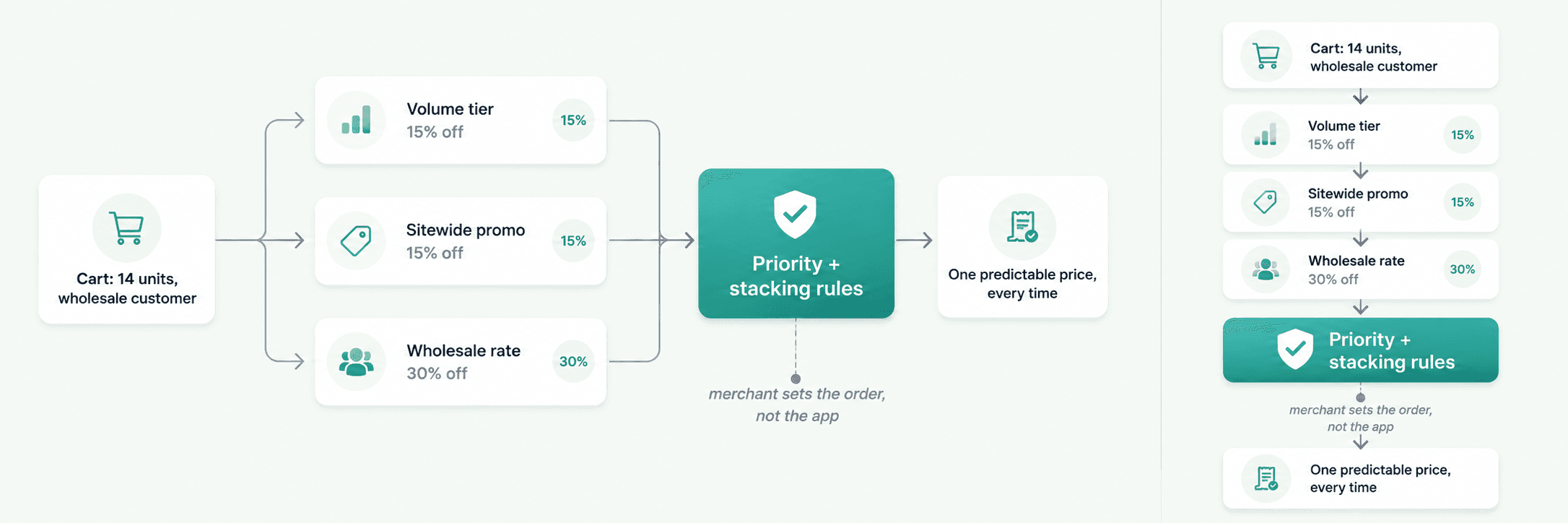
A customer has 14 units of a product. It sits in a volume tier, it's covered by a sitewide 15% promotion you're running this week, and the customer is on a wholesale account with a standing 30% rate. What do they pay?
Whatever answer you pick, it has to be the same answer every single time, and the merchant has to be able to predict it by looking at the rule list instead of reading the code. We went with explicit priority and defined stacking behaviour per rule type. The obvious alternative, "always apply whatever's best for the customer," sounds generous and quietly ships orders below your margin floor. We've seen that go wrong on other stores. It's not a default we wanted to own.
Who shouldn't install this
If you run one 10% code twice a year, stay native. An app is overhead you don't need.
Discountify earns its place when your pricing has structure. Multiple quantity tiers. Different rates for different customer types. Promotions that need to switch on and off on a schedule without someone remembering. If your discount logic currently lives in a spreadsheet or in your head, that's the signal.
Same test we apply to our bundle app, and to everything else we've built. If the platform does it, use the platform.
If your discounts went quiet in June
Tell us what the rule used to be. Plain English is fine, you don't need to know what a Function is. Most Scripts-era discount logic maps onto rule types we already support, and the ones that don't are usually a small piece of custom work rather than a rebuild.

Experienced Shopify App Developer specializing in Shopify app development, e-commerce architecture, and merchant-focused solutions. Skilled in building reliable, scalable applications that enhance the shopping experience, improve store performance, and help merchants grow their businesses.
Reader guide
Use the links below to jump into next reading without leaving the article flow.
Blog categories
Recent posts
First Order Discounts: How to Increase Shopify Conversions
10 minutes
How to Feed Dynamic, Merchant-Configured Data Into a Shopify Function (Input Query Variables Explained)
10 minuts
How to Bulk Update Shopify Prices Without Losing Your Original Ones
5 minutes
What Shopify’s Native Discounts Can’t Do, and Why We Built Discountify
4 minutes

