


The most common message we get about this feature is some version of "I created the box but nothing shows up on my product page."
Nine times out of ten, it's the same cause. The bundle exists in the app, and the app block was never added to the theme. Those are two separate steps, and the second one is easy to miss because nothing warns you about it.
So here's the whole thing, in order, including one setting that can quietly break checkout on stores using a third-party checkout provider.
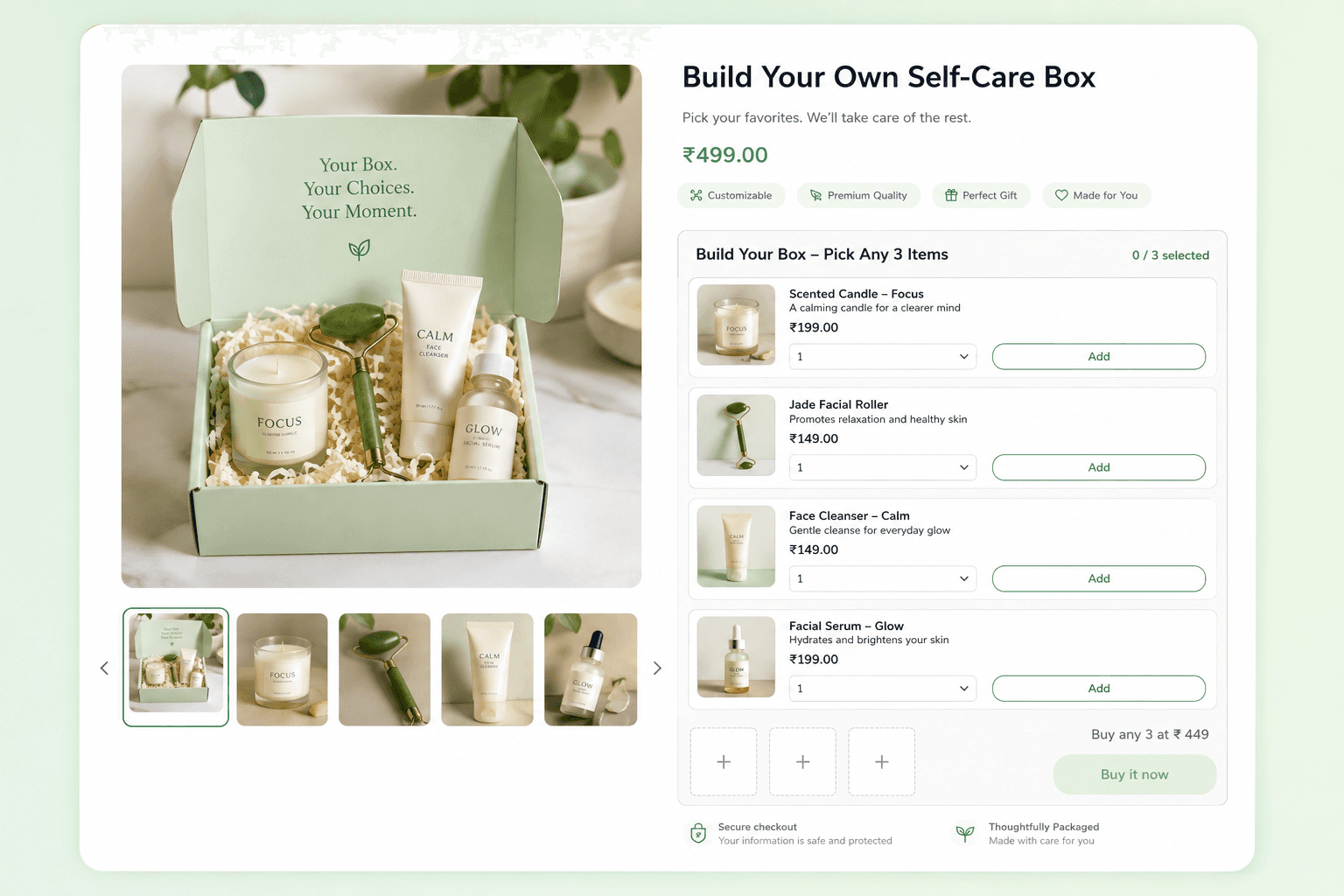
When a build-your-own box beats a fixed set
If you sell perfume, skincare, gift items, or apparel separates, customers usually arrive with a preference already formed. They don't want your set of four. They want their four.
Build Your Box lets them pick, while you keep control of the price, the minimum item count, and the inventory behind it.
I'll be honest about where it doesn't win. A Fixed Bundle is still better for a curated gift set where the exact contents are the product. Build Your Box wins when the shopper knows their own taste better than you do.
Two things merchants tell us about it that don't show up in the pitch:
Slower-moving SKUs move when you list them next to bestsellers as box options. They stop being a clearance problem and become part of a set.
The data is genuinely useful. What people pick when given a free choice tells you which pairings actually exist, not the ones you guessed at.
Step 1: Create the box in the app
In your Shopify admin, open AI Product Bundle Builder and:
Go to Bundles
Select Build Your Box
Click Create
Configure the settings below, then Save
The three settings that decide whether it works
Setting | What it does? |
|---|---|
Product page selection | Controls which product page the box appears on. Get this wrong and the widget never renders. It's the single most common setup mistake. |
Pricing type | Fixed price or percentage discount on the finished box. Read the third-party checkout section below before you pick percentage. |
Minimum products | How many items a customer needs before they can submit the box. This depends on the pricing option you chose, so confirm it matches what you intended before publishing. |
Step 2: Add the app block to your theme
In your Shopify admin, go to Sales Channels → Online Store → Themes
Click Edit theme on your published theme
From the top bar, choose Products → Default product, or whichever template your live product pages use
In the right sidebar, open Product information
Click Add block, then Apps
Pick the Build Your Box block under AI Product Bundle Builder
Drag it into position. Just above the Add to Cart button performs best, or directly under Buy Now
Save
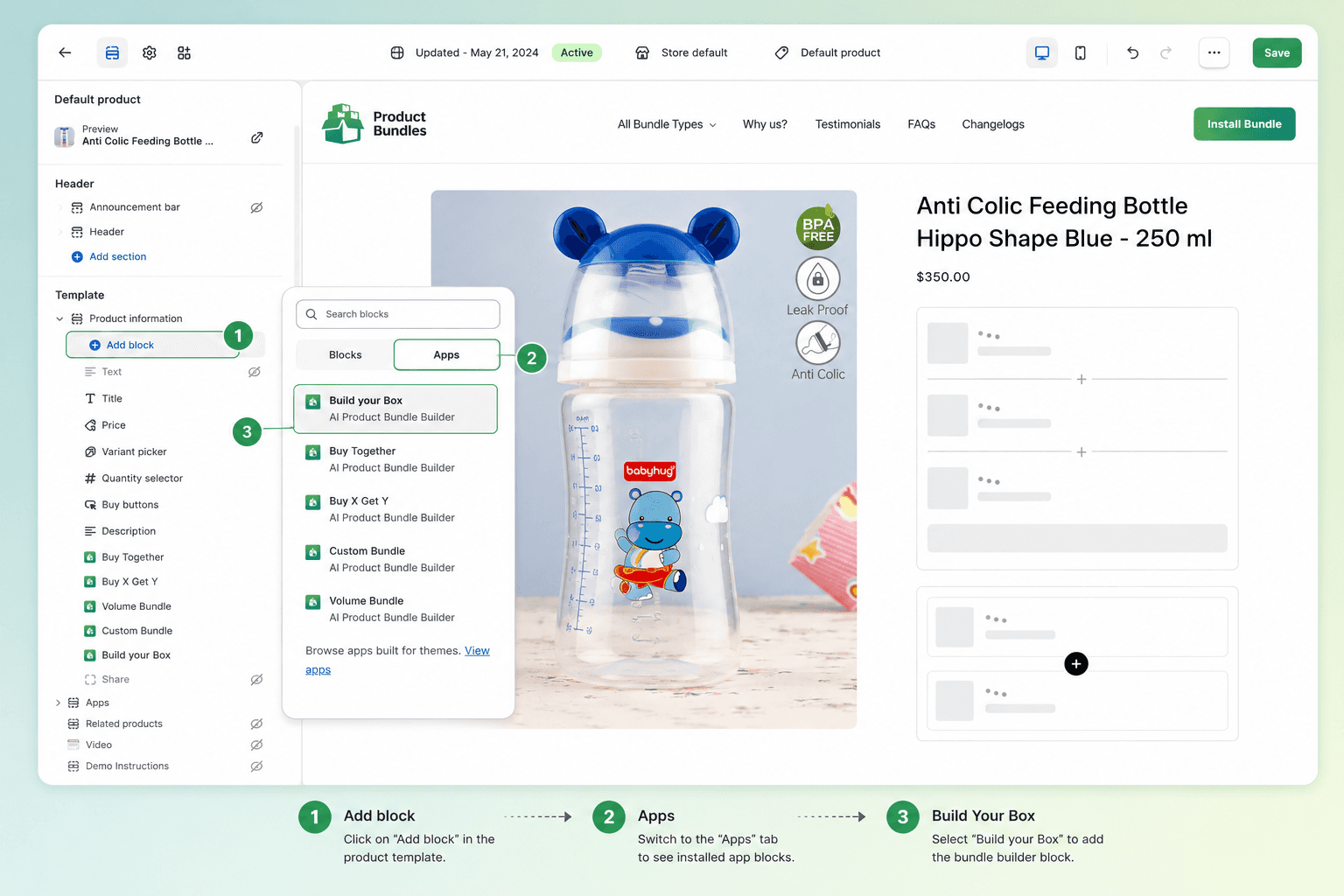
This needs an Online Store 2.0 theme, and the app embed has to be switched on in your theme's App Embeds section. Quick test for whether your theme qualifies: if you can add app blocks from that same sidebar, you're on OS 2.0.
Prefer to watch it? Full setup walkthrough on video.
What the shopper actually sees
The widget loads on the product page with the available items laid out. As they tap items, each one drops into a running selection bar inside the widget, so the box visibly fills up.
Once they've hit the minimum, they submit. Everything goes to cart together with the discount already applied at checkout.
Mobile works as-is, with no separate configuration. Two things it does not do right now: saving a box to finish later, and subscription boxes on a recurring schedule. If either is central to how you sell, that's a real limitation and you should know it before you build a campaign around this.
The percentage discount problem with third-party checkout
This is the part that costs people a weekend, so read it before you launch.
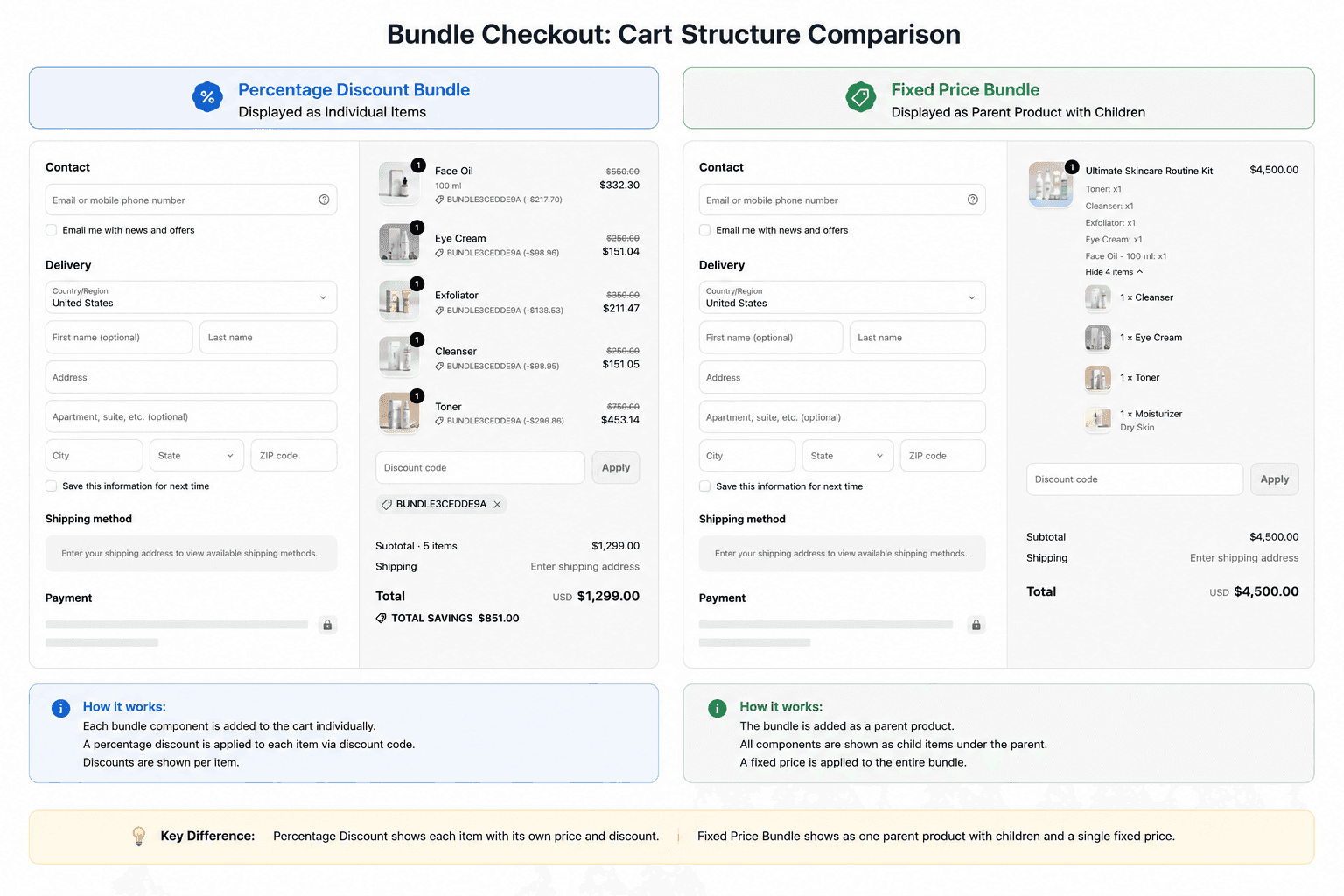
Percentage-based discounts rely on dynamic discount syncing. Some third-party checkout providers don't support that, and the discount doesn't carry through correctly.
The fix is a structural one. Use a fixed-price bundle with a main product selected. The cart then receives a single parent product, and the individually chosen items ride along as child items your fulfillment team can read straight off the order page.
The order arrives looking slightly different. In exchange, there's no discount syncing to fail.
Questions merchants ask us
Does it work with GoKwik?
Yes.
Does it work with Shiprocket?
Yes, as long as you set it up with a fixed price and a main product selected. That order structure is what Shiprocket expects.
If a main product is selected, how does my shipping team know what the customer picked?
The chosen items land as order note attributes, visible on the order page itself. Nobody has to look anything up.
Does inventory still track correctly when items come through as note attributes?
Yes. The app syncs inventory for those items regardless of how they appear on the order.
Do I need a developer?
No. App admin and theme editor, no code.
Is it on the free plan?
Yes.
Try it on your store
Setup runs about ten minutes once you know which product template your live pages use. Start with fixed price, set the minimum at three items, and watch what customers pick in the first week.
If your store needs something the standard setup doesn't cover, a different order structure for your warehouse or a specific discount behaviour, that's the kind of work we do.
Need Build Your Box to work a specific way for your store? Tell us what you need.

Sachin Gevariya is a Founder and Technical Director at Essence Solusoft. He is dedicated to making the best use of modern technologies to craft end-to-end solutions. He also has a vast knowledge of Cloud management. He loves to do coding so still doing the coding. Also, help employees for quality based solutions to clients. Always eager to learn new technology and implement for best solutions.
Reader guide
Use the links below to jump into next reading without leaving the article flow.
Blog categories
Recent posts
First Order Discounts: How to Increase Shopify Conversions
10 minutes
How to Feed Dynamic, Merchant-Configured Data Into a Shopify Function (Input Query Variables Explained)
10 minuts
How to Bulk Update Shopify Prices Without Losing Your Original Ones
5 minutes
What Shopify’s Native Discounts Can’t Do, and Why We Built Discountify
4 minutes

